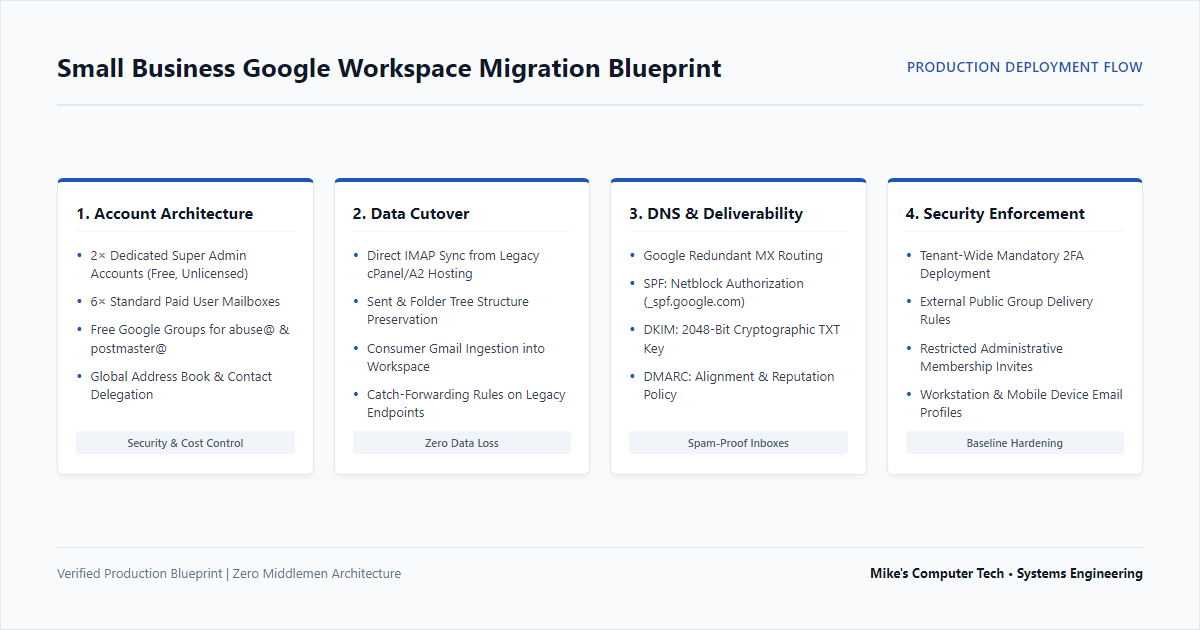
When a small business outgrows legacy shared cPanel webmail, migrating to Google Workspace is rarely as simple as pointing MX records and walking away. Without careful planning, teams face interrupted client communication, lost archives, and deliverability failures caused by modern SPF, DKIM, and DMARC enforcement.
Here is a field breakdown of the architecture, security baselines, and configuration steps executed during a recent migration for an active commercial operation.
1. Account Architecture & Licensing Optimization
Many small businesses inadvertently waste monthly seat costs by purchasing full licenses for administrative tasks or shared department functions.
- Dedicated Super Admin Structure: Instead of running day-to-day work from an unshielded administrative seat, we provisioned two dedicated, free Super Admin accounts protected by mandatory Two-Factor Authentication (2FA). Routine daily communications stay confined to standard user mailboxes.
- Smart Alias Routing: Departmental addresses like
contact@,info@, and legacy personnel addresses were configured as native email aliases directing into the primaryoffice@mailbox, saving recurring monthly seat fees while ensuring zero missed messages. - Compliance Routing via Free Google Groups: Rather than paying for dedicated mailboxes to handle domain compliance, we created native Google Groups for
postmaster@andabuse@. By updating group access settings to permit external public posting while restricting member management strictly to admins, the business captures bounce notifications and delivery alerts at zero license cost.
2. Historical Data Migration: cPanel & Consumer Gmail
Cutting over email without comprehensive historical data creates immediate operational friction.
- Server-to-Cloud IMAP Sync: All existing mail folders, sent archives, and nested directory trees were extracted and migrated directly from the legacy A2 Hosting cPanel server into the new Workspace mailboxes.
- Legacy Consumer Gmail Ingestion: Historical consumer Gmail accounts previously used by team members were backed up and imported into their new corporate mailboxes.
- Automated Catch-Forwarding: Real-time forwarding rules were established on the old accounts to catch any vendors still writing to personal addresses and redirect them into the official corporate inbox.
3. DNS Standardization & Strict Deliverability (SPF, DKIM, DMARC)
Major mail providers immediately throttle or junk incoming messages from domains lacking authenticated cryptographic signatures. The domain’s DNS was completely rebuilt:
- Google MX Records: Updated to direct incoming mail traffic cleanly to Google’s redundant mail servers.
- SPF (Sender Policy Framework): Hardened TXT records specifying Google’s netblocks as authorized senders while removing legacy web host IP addresses.
- DKIM (DomainKeys Identified Mail): Generated a 2048-bit cryptographic key within the Google Admin console and published the TXT record to enable outbound cryptographic signing.
- DMARC Record Deployment: Published an explicit DMARC TXT record to provide domain reputation protection and verify SPF/DKIM alignment across recipient mail servers.
4. Client Endpoints & Security Enforcement
A cloud migration is only finished when individual workstations and mobile devices are configured correctly.
- Device Profiles: Configured native Google Workspace profiles across client workstations, Chrome browsers, and mobile hardware.
- Tenant Security Baseline: Enforced tenant-wide policies requiring Two-Factor Authentication (2FA) setup across all active mailboxes to neutralize credential-stuffing and phishing attacks.
- Corporate Contact Sharing: Configured Global Contact Sharing rules to allow administrators to delegate address book access seamlessly across the primary team.
Frequently Asked Questions: Small Business Email Migration
Why did you choose this email solution?
The client was previously running shared A2 Hosting cPanel accounts that only forwarded mail to personal Gmail addresses because their company domain lacked a dedicated business email infrastructure. As their business communication needs scaled, forwarding became unsustainable. Furthermore, Google is deprecating traditional email fetching and “send-as” functionality for external POP accounts, forcing a move to a native, centralized platform.
Why is Google Workspace better than free consumer Gmail?
Free consumer Gmail offers no ownership over professional domain branding (@yourcompany.com), lacks centralized administrator controls, and provides no compliance or security baselines. Google Workspace delivers secure commercial mailboxes, shared team contacts, professional administrative management, and strict cryptographic authentication (SPF, DKIM, DMARC) required to prevent emails from landing in client spam folders.
Did all historical email messages and contacts transfer over successfully?
Yes. All historical corporate email data, archives, folder trees, and contacts were successfully migrated and imported from the legacy cPanel server and legacy consumer Gmail accounts into the new Google Workspace mailboxes.
Why Google Workspace instead of Microsoft 365 Business Email?
Google Workspace was selected because the team was already completely familiar with the native Gmail user interface, allowing for an immediate workflow transition with zero learning curve. While Microsoft 365 Business Email is an exceptional solution for clients who prefer Outlook (such as legal firms or heavy Excel/desktop-integration environments), Workspace matched this particular small business’s operational habits.
How long was email unavailable during the transition?
The entire data migration process took approximately 48 hours to background-sync and ingest historical archives safely. However, actual active email downtime during the final DNS cutover window was kept to roughly 12 hours.
Looking to Modernize Your Office Email?
Migrating corporate email requires meticulous data preservation and clean DNS authentication to keep daily business operations running without interruption.
If your team is dealing with spam issues, outgrowing shared hosting email, or planning a transition to Google Workspace or Microsoft 365, Contact Mike’s Computer Tech to schedule a direct consultation.